


 do you know what im doing wrong?
thanks a lot bro


Pokey


Posted 21 March 2012 - 12:50 PM
do you know what im doing wrong?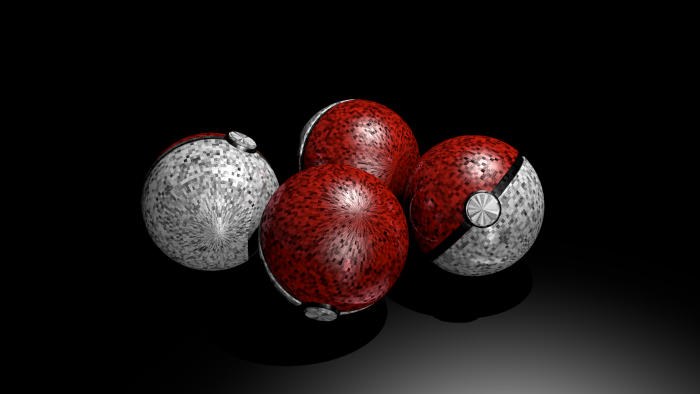

Dry Bones


Posted 22 March 2012 - 10:11 AM
Skrillax numbr 1 faen


Posted 22 March 2012 - 10:34 AM

Pokey
Posted 23 March 2012 - 12:25 PM
Can you take a picture of your textures tab? Also one your materials tab.
Also, try recalculating your normals.
Hi, nice render!
I think it has to do with the shading. Maybe the phong/smooth is a bit over set? Try to low that setting. I don't know blenders interface by the way so I can't tell you how.
And it can also be cause you added a noise shader to the pokeballs? Try checking your materials.
Good luck!
Edited by Crackkat, 23 March 2012 - 12:22 PM.
Bullet Bill


Posted 23 March 2012 - 03:19 PM


Skrillax numbr 1 faen
Posted 24 March 2012 - 12:45 AM
thank you, i will upload a screen shot of the tabs so u can see, thanks
ok i tried uploading a screenshot of the tab but it said upload skipped error500, so never mind that, any thing i should look out for that might indicate what the cause of the bad rendering is?
Edited by Hinkik, 24 March 2012 - 12:51 AM.
Pokey
Posted 24 March 2012 - 07:01 AM
Stuff you can try
- Remove the materials to check if it's a material issue
- Remove the ambient occlusion effect or higher the sampling of it
- Remove/scale down the black ball behind those red and white ones, maybe it's a interlacing issue.
- Press F10 on your keyboard and uncheck shad.
GOOOD LUUUUUCK!
Let me know if it works!
 u were almost right, u told me to try making the middle black bit smaller, as i tried to do that, i discovered that every single part in every single pokeball was duplicated 3 times
  (i have no idea how) so i basically just deleted all the overlapping duplicates and it worked i will upload a picture of it fixed thanks again
Jigglypuff

Posted 24 March 2012 - 03:18 PM
OK this is what you do. Check the blades on your machine see if a banana or a strawberry is stuck in it. Also make sure you have it plugged in to the outlet, because it won't turn on if it is not in it. That is all the advice I can give you, you're welcome.
 Bleh eh eh.
Hammer Bro.


Posted 24 March 2012 - 04:41 PM
thanks hinkik i solved the problem
Is this a troll post?

Jigglypuff
Posted 24 March 2012 - 06:19 PM
Yes, and now it obvious you want to be a pokey, am I wrong?Wasn't it obvious?
Edited by GameCube, 24 March 2012 - 06:22 PM.
Bleh eh eh.
The Dovahkiin


Posted 24 March 2012 - 06:21 PM
Yes, and now it obvious you want to be a pokey, am I wrong?
Edited by Joshua, 24 March 2012 - 06:21 PM.

Signature by Cerberuz


0 members, 1 guests, 0 anonymous users


